
What Is Moviemon? A Simple Python Tool to Get Movie Info in Your Terminal
What Is Moviemon?
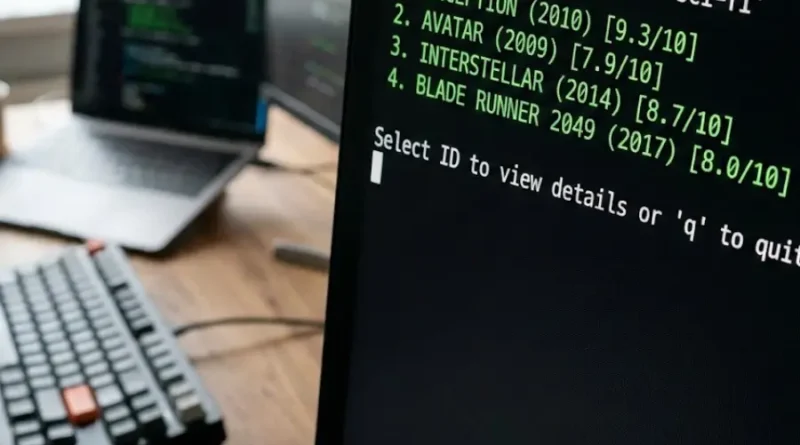
Moviemon is a command-line tool made by iCHAIT that shows you movie information directly in your terminal. Instead of opening your web browser, you type a command and get movie details on your screen right away.
The tool is built with <a href=”https://www.python.org/” target=”_blank” rel=”nofollow”>Python, a popular programming language</a>. It connects to a movie database, pulls the data, and displays it in an organized way. You don’t need to be a programmer to use it. If you can open a terminal and type a few words, you can use Moviemon.
Key Details about Moviemon:
- Creator: iCHAIT
- Type: Command-line interface (CLI) tool
- Language: Python-based
- Cost: Free and open source
- Purpose: View movie information without leaving your terminal
Why Do People Use Moviemon?
Speed and Convenience
You get movie data without waiting for web pages to load. No ads, no popups, no distractions. Just type a command and see the results immediately. This saves time when you need quick movie information.
For Python Developers and Learners
If you’re learning Python, Moviemon shows you how a real, working application functions. You can read its code and understand how command-line tools actually work. This makes it valuable for students and new programmers studying software development.
No Cost, Full Access
Moviemon is free. It’s also <a href=”https://opensource.org/osd” target=”_blank” rel=”nofollow”>open source software</a>, which means anyone can see how it’s built and modify it if they want. You never pay anything to use it.
Stay in Your Workspace
Many developers and tech workers spend their day in the terminal. Moviemon lets them stay in their work environment instead of switching between the terminal, browser, and other applications. This keeps your workflow smooth and efficient.
Lightweight and Simple
Moviemon doesn’t require much computer power. It runs fast and doesn’t slow down your system. It does one job and does it well.
How Does Moviemon Actually Work?
The Basic Process
Moviemon works through four simple steps. First, you install it on your computer using Python and pip (a package manager). Second, you open your terminal and type a command with the movie name you want to search for. Third, Moviemon connects to its movie database and retrieves the information. Fourth, the tool displays all the details organized on your screen.
What Information Does It Show?
When you search for a movie, Moviemon displays several details:
- Movie title
- Release year
- IMDb rating
- Plot summary
- Cast members
- Director information
- Genre
- Runtime
All this information appears in your terminal in a clean, readable format.
Example of How It Works
You open your terminal and type: “moviemon Inception”
Moviemon then searches its database for the movie Inception. Within seconds, you see the full movie details on your screen. No waiting for web pages, no ads appearing.
How to Install Moviemon: Step by Step
What You Need First
Your computer must have Python installed. Python is free and works on Windows, Mac, and Linux. If you don’t have it, go to python.org and download the latest version.
Installation Steps
Once Python is installed, the setup takes less than one minute:
- Open your terminal or command prompt
- Type this command: “pip install moviemon” (pip is <a href=”https://pip.pypa.io/en/stable/” target=”_blank” rel=”nofollow”>Python’s package installer</a>)
- Press Enter and wait for installation to complete
- That’s it. Moviemon is now ready to use.
Works on All Systems
The same installation process works whether you use Windows, Mac, or Linux. You don’t need different versions or complicated setup procedures.
How to Use Moviemon: Basic Commands
Searching for a Movie
Open your terminal and type “moviemon” followed by the movie name. For example:
moviemon Inception
The tool searches for that movie and displays complete information on your screen.
Searching by Year
If multiple movies share the same name, you can add the year to narrow your search:
moviemon Inception 2010
What Happens When You Search
Moviemon connects to its database, finds the movie data, and displays it within seconds. The information is formatted clearly so you can read it easily. If Moviemon can’t find the movie, it tells you and suggests trying a different name or year.
Real Benefits of Using Moviemon
Benefit 1: Learn How Programs Work
If you’re new to Python, reading Moviemon’s code teaches you how software applications function. You see actual examples of how programmers solve problems. This practical knowledge helps you build your own projects.
Benefit 2: Get Movie Information Instantly
No more opening browsers and waiting for websites to load. Search for a movie, get results in seconds. This is much faster than using Google or IMDb websites.
Benefit 3: Stay Focused on Your Work
When you work in your terminal, switching to a browser breaks your focus. Moviemon keeps you in your work environment. You get information without leaving your coding workspace.
Benefit 4: Customize It to Your Needs
If you know Python, you can change how Moviemon works. Add features, modify the display, or connect it to different databases. The open source code lets you adapt it however you want.
Benefit 5: Work Offline in Some Cases
Once installed, you can use Moviemon without internet if your setup allows it. This is useful when your internet connection is slow or unavailable.
Benefit 6: Zero Cost
Moviemon is completely free. You never pay subscription fees, never see ads, never deal with paywalls. Everything is free, forever.
Who Should Use Moviemon?
Students Learning to Code
If you’re studying Python or computer science, Moviemon is a perfect tool to practice with. You get hands-on experience with a real application.
Professional Developers
Developers who spend hours in the terminal benefit from quick access to movie information without switching applications.
Movie Enthusiasts
If you love movies and want quick details without web browser delays, Moviemon works well for you.
System Administrators
People who manage servers and work primarily in command-line interfaces can use Moviemon for entertainment and information during breaks.
Tech Learners and Hobbyists
Anyone curious about how <a href=”https://en.wikipedia.org/wiki/Command-line_interface” target=”_blank” rel=”nofollow”>command-line interfaces work</a> and wanting to explore new technologies will find Moviemon interesting and educational.
Basically, anyone who:
- Works in a terminal regularly
- Wants fast movie information
- Loves learning how software works
- Prefers simple, lightweight tools
- Enjoys open source projects
Moviemon vs Other Movie Information Tools
Comparing Moviemon to Other Options
You have several ways to get movie information today. Each option has different strengths and weaknesses.
Google Search
- Speed: Slow (page load time)
- Cost: Free
- Ads: Yes, many ads
- Best for: Quick searches when you don’t need details
IMDb Website
- Speed: Moderate (depends on internet)
- Cost: Free with ads, or paid without ads
- Ads: Yes, unless you pay
- Best for: Complete movie information with user reviews
Movie Apps (Phone/Tablet)
- Speed: Fast
- Cost: Free or paid
- Ads: Often yes
- Best for: Quick searches on mobile devices
Moviemon (Command-line)
- Speed: Fastest (no page load)
- Cost: Free
- Ads: None
- Best for: Terminal users, developers, quick lookups
Why Choose Moviemon Specifically?
Moviemon wins when you value speed and simplicity. You get movie information faster than any website because there’s no page loading time. There are no ads interrupting you. If you work in a terminal, it keeps you in your workflow. It’s free with no hidden costs.
However, if you want the most complete movie database with user reviews and ratings, IMDb has more information. If you need a mobile app, Moviemon isn’t available on phones. Moviemon is best for people who work on computers in terminal environments.
Getting Started with Moviemon Today
Your First Steps
If Moviemon sounds useful to you, here’s how to begin:
- Make sure Python is installed on your computer (go to python.org if not)
- Open your terminal or command prompt
- Type: “pip install moviemon”
- Wait for installation to complete
- Try your first search: “moviemon Avatar”
- See the movie information appear on your screen
Trying It Out
The entire process takes about 5 minutes. Search for a few of your favorite movies. See how the information displays. Notice how fast it is compared to opening a web browser.
No Risk in Trying
Moviemon doesn’t require payment. It doesn’t take up much computer space. If you decide it’s not for you after trying it, you can uninstall it easily. You lose nothing by experimenting.
Learning More
After you start using Moviemon, visit its GitHub page to see the code and learn how it works. Read the documentation to discover advanced features you might not know about.
Understanding Moviemon’s Purpose and Design
What Moviemon Does Best
Moviemon solves a specific problem for a specific group of people. It gives terminal users instant access to movie information without leaving their work environment. It does this one job efficiently.
What Moviemon Doesn’t Do
Moviemon doesn’t have a beautiful graphical interface like website apps. It doesn’t show user reviews or ratings from regular people. It doesn’t have advanced filtering like some movie websites. It doesn’t work on phones directly.
Why This Design Works
The simplicity of Moviemon is actually its strength. It’s fast because it doesn’t load graphics or ads. It works on any computer because it only needs a terminal. It’s free because it doesn’t need expensive servers to maintain.
Who Built Moviemon and Why
iCHAIT created Moviemon as a practical Python project. It demonstrates how developers can build useful command-line tools. The project shows that simple solutions often work better than complicated ones.
Moviemon and Python Programming
Why Developers Value Moviemon
Professional developers see value in Moviemon beyond just getting movie information. It’s a teaching tool. Students can read the code and understand how real applications connect to databases and display information.
What You Learn from Moviemon’s Code
By studying Moviemon’s code, you learn:
- How to create command-line interfaces
- How to connect to external databases
- How to format and display data cleanly
- How to handle user input in Python
- How to structure a Python project properly
Contributing to Moviemon
Since Moviemon is open source, developers can contribute improvements. You could add features, fix bugs, or improve the code. This is how open source projects grow and improve.
FAQs
Do I need to be a programmer to use Moviemon?
No. You just need to know basic terminal commands. Open a terminal, type the command, press Enter. That’s all. You don’t write any code or understand programming concepts.
Is Moviemon really free?
Yes, completely free. It’s open source software. You download it, install it, and use it without paying anything ever.
Can I use Moviemon on my phone?
Not directly on your phone. Moviemon only works on computers with terminal access. However, you could use Moviemon on a computer and access it remotely from your phone using certain tools, but that’s more advanced.
What happens if Moviemon can’t find a movie?
Moviemon will tell you it couldn’t find the movie. Try searching with a different title. Some movies have alternate names or different spellings. If it’s a very new or very old movie, it might not be in the database.
Does Moviemon work on Windows, Mac, and Linux?
Yes. If your computer has Python installed, Moviemon works the same way on all three operating systems. The installation and usage are identical.
How accurate is Moviemon’s movie information?
Moviemon pulls data from public movie databases. The information is generally accurate but may sometimes have variations depending on the database source. For critical information, cross-checking with IMDb is recommended.
Can I modify Moviemon for my own use?
Yes. Since it’s open source, you can change the code. If you know Python, you can add features, change the display format, or connect it to different databases.
Does Moviemon need internet to work?
Yes, currently Moviemon requires internet to fetch movie data from its database. It can’t work completely offline because it needs to retrieve information from online sources
Conclusion
Moviemon is an excellent tool if you work in a terminal, value speed and simplicity, and don’t need complex features. It’s perfect for developers, students, and tech enthusiasts who want movie information without leaving their workspace.
Moviemon does one specific job very well. It gives you movie information instantly in your terminal. It’s free, it’s fast, and it works on any computer with Python installed. It’s not trying to be IMDb or Netflix. It’s trying to be the fastest way to get basic movie information without opening your browser.
If this sounds useful, install Python if you don’t have it, then install Moviemon using the pip command. Try searching for your favorite movie. You’ll immediately see why terminal users value this tool.
If Moviemon isn’t your thing, that’s okay too. Different tools work for different people. But now you understand what it is, how it works, and who benefits from it.
Visit the rest of the site for more interesting and useful articles.
